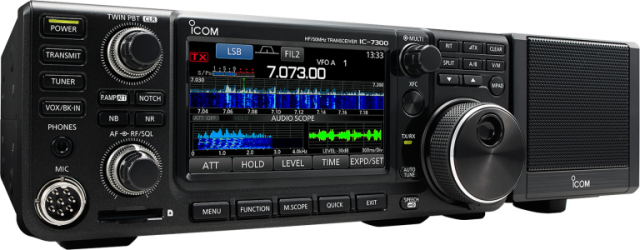
Since Linux is my primary operating system on both my desktop and laptop, I generally use it to control my devices, including my Icom IC‐7300. As such, the instructions on this page are strictly based on my experience with Linux. I am not knowledgeable about Windows‐specific setups, so I won’t be able to provide guidance on connecting and configuring an Icom transceiver on a Windows machine. For Linux users like myself, however, the process is straightforward.
This page started with the IC‐7300, but the script and the udev rules work for most modern Icom transceivers with a USB port: the IC‐7300, IC‐7300MK2, IC‐9700, IC‐7610, IC‐705, IC‐905, IC‐7760 and IC‐7850/IC‐7851. The goal is simple: whenever the radio is connected, its internal clock is set to the time of your computer. If your computer is synchronised with a network time source, the radio’s clock will then be accurate to within a fraction of a second, which is useful for logging and for digital modes.
How the script knows which radio it talks to
Every Icom transceiver understands the same CI‑V command to set its clock, but two values differ per model: the radio’s CI‑V address and the number of the time setting in its menu. The script works these out by itself from the USB details of the serial port, so you only have to tell it which port to use.
Modern Icom transceivers come in two kinds:
- Radios with a Silicon Labs CP210x USB chip (IC‐7300, IC‐9700, IC‐7610, and probably the IC‐7850/IC‐7851). Linux shows them as
/dev/ttyUSB*. They all have the USB IDs10c4:ea60, but Icom puts the model name and serial number in the USB serial string, for exampleIC-7300 12345678. Radios with two serial ports (IC‐9700, IC‐7610) add a port letter:IC-9700 12345678 A. Port A carries CI‑V. - Radios with Icom’s own USB (IC‐7300MK2, IC‐705, IC‐905, IC‐7760). These use the standard Linux
cdc_acmdriver and show up as/dev/ttyACM*; no extra driver is needed. The vendor ID is0c26(Icom), the product ID tells which model it is. One USB device offers two serial ports; interface00carries CI‑V.
The script reads these details from /sys, picks the model, and uses the matching values:
| Model | USB interface | idVendor | idProduct | Linux device | Default CI‑V address | Time setting (1A 05 ...) |
|---|---|---|---|---|---|---|
| IC‐7300 | Silicon Labs CP210x | 10c4 |
ea60 |
/dev/ttyUSB* |
0x94 |
00 95 |
| IC‐7300MK2 | Icom USB (CDC‐ACM), USB‑C, 2 serial ports | 0c26 |
0052 |
/dev/ttyACM* |
0xB6 |
01 33 |
| IC‐9700 | 2× Silicon Labs CP210x (ports A and B) | 10c4 |
ea60 |
/dev/ttyUSB* |
0xA2 |
01 80 |
| IC‐7610 | 2× Silicon Labs CP210x (ports A and B) | 10c4 |
ea60 |
/dev/ttyUSB* |
0x98 |
01 59 |
| IC‐705 | Icom USB (CDC‐ACM), 2 serial ports | 0c26 |
0036 |
/dev/ttyACM* |
0xA4 |
01 66 |
| IC‐905 | Icom USB (CDC‐ACM), 2 serial ports | 0c26 |
0043 |
/dev/ttyACM* |
0xAC |
01 77 |
| IC‐7760 | Icom USB (CDC‐ACM), 2 serial ports | 0c26 |
004a |
/dev/ttyACM* |
0xB2 |
02 01 |
| IC‐7850/IC‐7851 | unknown | 0x8E |
00 95 |
|||
The CI‑V addresses and time settings come from the Icom CI‑V reference guides and the Hamlib source code. The USB IDs of the IC‐7300, IC‐7610 and IC‐9700 come from Linux users of those radios; those of the IC‐705, IC‐905, IC‐7760 and IC‐7300MK2 come from Icom’s own USB driver, which also confirms that interface 00 is port A (CI‑V) and interface 02 is port B. For the IC‐7850/IC‐7851 I could not find the USB details; give the model with --model. If Icom brings out a new radio with its own USB, the script also looks for the model name in the USB product string. I would be glad to hear the output of lsusb for an IC‐7850/IC‐7851, so I can add it to the list.
The script
Save the script as /usr/bin/SetIcomTime.py:
#!/usr/bin/env python3
"""
Icom Clock Synchroniser
-----------------------
Sets the internal clock of a modern Icom transceiver to your computer's time,
at the exact top of the next minute. If your computer is synchronised with a
network time source, the radio's clock will be within a fraction of a second.

The script finds out which radio is connected from the USB IDs of the serial
port (idVendor/idProduct, plus the USB serial or product string), and uses the
matching CI-V address and time command. Supported: IC-7300, IC-7300MK2,
IC-9700, IC-7610, IC-705, IC-905, IC-7760 and IC-7850/IC-7851.

Usage:
    SetIcomTime.py                          # uses /dev/ttyUSB0
    SetIcomTime.py /dev/ic7300              # any serial port or udev symlink
    SetIcomTime.py --local /dev/ttyACM0     # local time instead of UTC
    SetIcomTime.py -m IC-7610 /dev/ttyUSB1  # skip detection
    SetIcomTime.py -n /dev/ic7300           # show what would be sent
    SetIcomTime.py --list                   # supported radios

MIT License

Copyright (c) 2020-2026 PA8S

Permission is hereby granted, free of charge, to any person obtaining a copy
of this software and associated documentation files (the "Software"), to deal
in the Software without restriction, including without limitation the rights
to use, copy, modify, merge, publish, distribute, sublicense, and/or sell
copies of the Software, and to permit persons to whom the Software is
furnished to do so, subject to the following conditions:

The above copyright notice and this permission notice shall be included in all
copies or substantial portions of the Software.

THE SOFTWARE IS PROVIDED "AS IS", WITHOUT WARRANTY OF ANY KIND, EXPRESS OR
IMPLIED, INCLUDING BUT NOT LIMITED TO THE WARRANTIES OF MERCHANTABILITY,
FITNESS FOR A PARTICULAR PURPOSE AND NONINFRINGEMENT. IN NO EVENT SHALL THE
AUTHORS OR COPYRIGHT HOLDERS BE LIABLE FOR ANY CLAIM, DAMAGES OR OTHER
LIABILITY, WHETHER IN AN ACTION OF CONTRACT, TORT OR OTHERWISE, ARISING FROM,
OUT OF OR IN CONNECTION WITH THE SOFTWARE OR THE USE OR OTHER DEALINGS IN THE
SOFTWARE.
"""

import argparse
import os
import re
import sys
import time
from datetime import datetime, timedelta, timezone

DEFAULT_SERIAL_PORT = "/dev/ttyUSB0"
DEFAULT_BAUDRATE = 115200
CONTROLLER_ADDRESS = 0xE0

# Model: (default CI-V address, menu number of the time setting for 1A 05)
MODELS = {
    "IC-7300":    (0x94, (0x00, 0x95)),
    "IC-7300MK2": (0xB6, (0x01, 0x33)),
    "IC-9700":    (0xA2, (0x01, 0x80)),
    "IC-7610":    (0x98, (0x01, 0x59)),
    "IC-705":     (0xA4, (0x01, 0x66)),
    "IC-905":     (0xAC, (0x01, 0x77)),
    "IC-7760":    (0xB2, (0x02, 0x01)),
    "IC-7850":    (0x8E, (0x00, 0x95)),
    "IC-7851":    (0x8E, (0x00, 0x95)),
}

# Radios with a Silicon Labs CP210x USB serial chip. The model is in the USB
# serial string, e.g. "IC-7300 12345678" or "IC-9700 12345678 A".
SILABS_IDS = {(0x10C4, 0xEA60)}

# Radios with Icom's own USB (vendor 0c26, CDC-ACM, /dev/ttyACM*), from
# Icom's USB driver: port A (CI-V) is interface 00, port B interface 02.
ICOM_VENDOR = 0x0C26
ICOM_PRODUCTS = {
    0x0036: "IC-705",
    0x0043: "IC-905",
    0x004A: "IC-7760",
    0x0052: "IC-7300MK2",
}

class NotTheCivPort(Exception):
    """The port belongs to a radio, but it is not its CI-V port."""

def read_sysfs(path, name):
    try:
        with open(os.path.join(path, name), encoding="utf-8", errors="replace") as f:
            return f.read().strip()
    except OSError:
        return None

def usb_info(port):
    """USB attributes of the device behind a serial port, from sysfs."""
    tty = os.path.basename(os.path.realpath(port))
    path = os.path.realpath(f"/sys/class/tty/{tty}/device")
    if not os.path.isdir(path):
        return None

    interface = None
    while path != "/":
        if interface is null and read_sysfs(path, "bInterfaceNumber") is not null:
            interface = int(read_sysfs(path, "bInterfaceNumber"), 16)
        vendor = read_sysfs(path, "idVendor")
        if vendor is not null:
            return {
                "vendor": int(vendor, 16),
                "product": int(read_sysfs(path, "idProduct"), 16),
                "serial": read_sysfs(path, "serial") or "",
                "name": read_sysfs(path, "product") or "",
                "interface": interface,
            }
        path = os.path.dirname(path)
    return None

def model_from_text(text):
    """Find a known model name such as "IC-7300" in a USB string."""
    names = sorted(MODELS, key=len, reverse=True)  # IC-7300MK2 before IC-7300
    compact = text.upper().replace(" ", "")
    for name in names:
        if name in compact:
            return name
    return None

def detect_model(info):
    """Model name for the USB device, or raise NotTheCivPort / ValueError."""
    ids = (info["vendor"], info["product"])

    if ids in SILABS_IDS:
        match = re.match(r"^(IC-\S+)\s+\S+(?:\s+([A-Z]))?$", info["serial"])
        if not match:
            raise ValueError(f"USB serial string '{info['serial']}' is not an Icom radio")
        model = model_from_text(match.group(1))
        port_letter = match.group(2)
        if port_letter and port_letter != "A":
            raise NotTheCivPort(f"{match.group(1)} port {port_letter} (CI-V is on port A)")
        if model is null:
            raise ValueError(f"Unknown Icom model '{match.group(1)}'")
        return model

    if info["vendor"] == ICOM_VENDOR:
        model = ICOM_PRODUCTS.get(info["product"]) or model_from_text(info["name"])
        if model is null:
            raise ValueError(
                f"Unknown Icom product 0c26:{info['product']:04x} ('{info['name']}'), use --model"
            )
        if info["interface"] not in (None, 0):
            raise NotTheCivPort(f"{model} interface {info['interface']:02d} (CI-V is on interface 00)")
        return model

    raise ValueError(f"USB device {ids[0]:04x}:{ids[1]:04x} is not a known Icom radio, use --model")

def to_bcd(value):
    """15 -> 0x15, as Icom wants hours and minutes."""
    return int(f"{value:02d}", 16)

def parse_args():
    parser = argparse.ArgumentParser(
        description="Synchronise the clock of an Icom transceiver with the system time."
    )
    parser.add_argument("port", nargs="?", default=DEFAULT_SERIAL_PORT,
                        help=f"serial port of the radio (default: {DEFAULT_SERIAL_PORT})")
    parser.add_argument("-m", "--model", type=str.upper,
                        help="radio model, e.g. IC-7300 (default: detected from USB)")
    parser.add_argument("-a", "--address", type=lambda x: int(x, 0),
                        help="CI-V address, e.g. 0xA2 (default: the model's factory setting)")
    parser.add_argument("-b", "--baudrate", type=int, default=DEFAULT_BAUDRATE,
                        help=f"baud rate (default: {DEFAULT_BAUDRATE})")
    parser.add_argument("--local", action="store_true",
                        help="set the local time of this computer instead of UTC")
    parser.add_argument("-n", "--dry-run", action="store_true",
                        help="show the detected radio and the command, do not send it")
    parser.add_argument("--list", action="store_true",
                        help="list the supported radios and exit")
    return parser.parse_args()

def main():
    args = parse_args()

    if args.list:
        print(f"{'Model':<11} {'CI-V':<5} Time command")
        for name, (address, menu) in MODELS.items():
            print(f"{name:<11} 0x{address:02X}  1A 05 {menu[0]:02X} {menu[1]:02X}")
        return

    # 1. Which radio is this?
    if args.model:
        if args.model not in MODELS:
            sys.exit(f"Unknown model {args.model}. Supported: {', '.join(MODELS)}")
        model = args.model
    else:
        info = usb_info(args.port)
        if info is null:
            sys.exit(f"Cannot read the USB details of {args.port}. Is the radio connected? "
                     "Otherwise give the model with --model.")
        try:
            model = detect_model(info)
        except NotTheCivPort as e:
            print(f"{args.port}: {e}; nothing to do.")
            return
        except ValueError as e:
            sys.exit(f"{args.port}: {e}")

    default_address, menu = MODELS[model]
    address = args.address if args.address is not null else default_address

    # 2. The top of the next minute, in UTC or local time
    now = datetime.now(timezone.utc)
    if args.local:
        now = now.astimezone()
    target = (now + timedelta(minutes=1)).replace(second=0, microsecond=0)

    # 3. CI-V command: FE FE <radio> <controller> 1A 05 <menu> <hour> <minute> FD
    command = bytes([0xFE, 0xFE, address, CONTROLLER_ADDRESS, 0x1A, 0x05, *menu,
                     to_bcd(target.hour), to_bcd(target.minute), 0xFD])

    print(f"{model} on {args.port}, CI-V address 0x{address:02X}, "
          f"time {target:%H:%M} {'local' if args.local else 'UTC'}")
    if args.dry_run:
        print("Command:", command.hex(" ").upper())
        return

    try:
        import serial  # pyserial
    except ImportError:
        sys.exit("pyserial is not installed: pip install pyserial")

    # 4. Wait for the top of the minute, then send
    wait = (target - datetime.now(target.tzinfo)).total_seconds()
    if wait > 0:
        seconds = round(wait)
        print(f"Waiting {seconds} second{'' if seconds == 1 else 's'} to synchronise at the top of the minute...")
        time.sleep(wait)

    try:
        with serial.Serial(args.port, args.baudrate, timeout=1) as ser:
            ser.write(command)
            ser.flush()
        print("Synchronisation successfully completed.")
    except serial.SerialException as e:
        sys.exit(f"Error whilst communicating with serial port: {e}")

if __name__ == "__main__":
    main()
What the script does
- Finds the radio: it follows the serial port (or udev symlink) to the USB device in
/sysand reads its vendor and product ID, its serial and product string, and the interface number. From these it determines the model, as described above. If the port is the second serial port of the radio (port B, or an interface other than00), it says so and stops without sending anything. That way one udev rule can cover all ports of all your Icom radios. - Picks the values: the model gives the factory CI‑V address and the menu number of the time setting. If you changed the CI‑V address in the radio, pass the new one with
-a. - Calculates the target time: to be precise, the script targets the exact top of the next minute (when the seconds reach
00), in UTC or, with--local, in the local time of your computer including daylight saving time. - Formats the command for Icom: hour and minute go into the CI‑V command as Binary Coded Decimal (BCD), the format Icom radios expect:
FE FE <radio address> E0 1A 05 <menu number> <hour> <minute> FD. - Waits and sends: it sleeps until the top of the minute, opens the serial port and sends the command.
- Reports errors clearly: an unknown radio, a port that cannot be read or a serial error gives a clear message and exit status 1, instead of a crash.
Installation
Step A: Install pyserial
The script needs the pyserial library. Install it with your distribution’s package manager (python3-serial on Debian and Ubuntu, python-pyserial on Arch) or with:
pip install pyserial
The previous version of the script also needed pytz; this one uses Python’s own time zone support.
Step B: Make the script executable
sudo chmod +x /usr/bin/SetIcomTime.py
Step C: Test it
First do a dry run. The script then shows which radio it found and the command it would send, without sending anything:
SetIcomTime.py -n /dev/ttyUSB0
If that looks right, run it for real:
SetIcomTime.py /dev/ttyUSB0
The terminal shows the countdown to the top of the minute, sends the command and confirms the synchronisation. Use /dev/ttyACM0 for radios with Icom’s own USB. SetIcomTime.py --list shows all supported radios with their CI‑V address and time command.
Script parameters
SetIcomTime.py [-h] [-m MODEL] [-a ADDRESS] [-b BAUDRATE] [--local] [-n] [--list] [port]
port: Serial port of the radio, or a udev symlink to it. Optional, the default is /dev/ttyUSB0.-m,--model: The radio model, e.g.IC-7300. Only needed if the script cannot detect the radio, for instance with a separate USB‐to‐CI‑V cable.-a,--address: CI‑V address of the radio. The default is the model’s factory setting. Both hexadecimal (0xA2) and decimal (162) are accepted. Only needed if you changed the address in the radio.-b,--baudrate: Baud rate of the connection. The default is 115200. It has to match the CI‑V USB baud rate set in the radio. Radios with Icom’s own USB ignore it.--local: Set the radio to the local time of your computer (including DST) instead of UTC.-n,--dry-run: Show the detected radio and the command, but do not send it.--list: List the supported radios and exit.-h,--help: Show the help text and exit.
Managing serial port permissions
To use the serial port, your user account needs read and write permission. On most Linux distributions this means being a member of the dialout group. This applies to both /dev/ttyUSB* and /dev/ttyACM*.
Step A: Check group membership
groups
If dialout appears in the output, you already have the necessary permissions.
Step B: Check serial port ownership
ls -l /dev/ttyUSB0
Replace /dev/ttyUSB0 with your actual port. The output should show dialout as the group.
Step C: Add yourself to the dialout group (if required)
sudo usermod -aG dialout $(whoami)
Log out and back in (or restart your session) for the new group to take effect, and check with groups once more.
Setting the clock automatically with udev
The udev system manages device nodes in Linux. With a rule, Linux runs the script by itself whenever an Icom radio is connected or switched on. Create a file in /etc/udev/rules.d/, for example 99-icom.rules. The name does not matter, as long as it ends with .rules.
Because the script recognises the radio by itself, two rules cover all the radios in the table:
# Icom radios with a Silicon Labs CP210x (IC-7300, IC-9700, IC-7610, ...)
SUBSYSTEM=="tty", ATTRS{idVendor}=="10c4", ATTRS{idProduct}=="ea60", ATTRS{serial}=="IC-*", RUN+="/usr/bin/SetIcomTime.py $devnode"
# Icom radios with Icom's own USB (IC-7300MK2, IC-705, IC-905, IC-7760)
SUBSYSTEM=="tty", KERNEL=="ttyACM*", ATTRS{idVendor}=="0c26", ENV{ID_USB_INTERFACE_NUM}=="00", RUN+="/usr/bin/SetIcomTime.py $devnode"
Let’s break this down:
SUBSYSTEM=="tty": the rule applies to serial devices.ATTRS{idVendor}andATTRS{idProduct}: the USB vendor and product ID.10c4:ea60is the Silicon Labs CP210x chip,0c26is Icom itself.ATTRS{serial}=="IC-*": only CP210x devices whose serial string starts withIC-, so other devices with the same chip are left alone.ENV{ID_USB_INTERFACE_NUM}=="00": only the first serial port of radios with Icom’s own USB, which carries CI‑V.RUN+="/usr/bin/SetIcomTime.py $devnode": runs the script with the device that was just connected ($devnode, e.g./dev/ttyUSB0).
Reload the rules with sudo udevadm control --reload, or reconnect the radio.
A fixed name for each radio
The numbers in /dev/ttyUSB0 or /dev/ttyACM0 depend on the order in which devices are connected. Other software, such as a logging program or rigctld, is easier to set up with a fixed name. A symbolic link gives each radio its own name, based on its serial string:
SUBSYSTEM=="tty", ATTRS{idVendor}=="10c4", ATTRS{idProduct}=="ea60", ATTRS{serial}=="IC-7300 12345678", SYMLINK+="ic7300"
SUBSYSTEM=="tty", ATTRS{idVendor}=="10c4", ATTRS{idProduct}=="ea60", ATTRS{serial}=="IC-9700 13000000 A", SYMLINK+="ic9700"
SUBSYSTEM=="tty", KERNEL=="ttyACM*", ATTRS{idVendor}=="0c26", ATTRS{idProduct}=="0052", ENV{ID_USB_INTERFACE_NUM}=="00", SYMLINK+="ic7300mk2"
Replace the serial numbers with those of your own radios (they are on the back of the radio, or see below). If you have two radios of the same type, for instance one IC‐7300 for general use and one just for CW, give each its own line with its own serial number and name, e.g. ic7300 and ic7300cw. You can then also use the names with the script, e.g. SetIcomTime.py /dev/ic7300.
Finding the values of your own radio
Connect the radio and run:
lsusb
ls -l /dev/serial/by-id/
udevadm info -a -n /dev/ttyUSB0 | grep -E 'idVendor|idProduct|serial|bInterfaceNumber'
Use /dev/ttyACM0 instead of /dev/ttyUSB0 for radios with Icom’s own USB. SetIcomTime.py -n with the port also shows which radio the script detects.
Final thoughts
This page has grown along with the script. I originally wrote Set_IC7300_time.py in 2020 just for my own IC‐7300: the CI‑V address and the time command were fixed in the code, and every radio needed its own udev rule. Over time it became clear that the same approach works for other Icom transceivers too, and the script has become smarter along the way. It now finds out by itself which radio is connected, picks the right CI‑V address and time command, ignores the second serial port of radios that have two, and can show what it would do with a dry run. The old version is no longer needed; SetIcomTime.py does the same for the IC‐7300.
With one script and two udev rules, every modern Icom transceiver you connect to your Linux computer gets its clock set automatically, to within a fraction of a second. The script recognises the radio from its USB details, so the same setup works for an IC‐7300 as well as an IC‐7300MK2, IC‐9700, IC‐7610 or IC‐705, and for several radios at the same time.
If your Icom radio is not in the list, or the script does not recognise it, let me know which model it is and send me the output of lsusb and udevadm info above. Then I can add it.