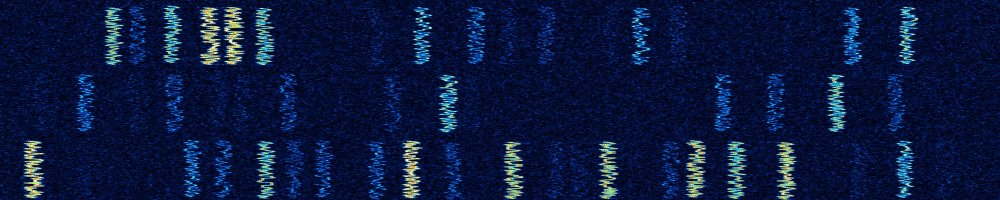
FT8 and FT4 operating tips
Clean signals and smooth QSOs
FT8 has become the most popular mode on HF, and FT4 is its faster sibling for contests and short openings. Both are easy to get started with, but a few habits make a big difference for your own success and for everyone else on the frequency. The frequencies themselves are on the page frequencies for digital modes.
Table of Contents
The basics
| FT8 | FT4 | |
|---|---|---|
| Transmit period | 15 seconds | 7.5 seconds |
| Bandwidth | 50 Hz | 90 Hz |
| Decodes down to about | −21 dB | −17 dB |
| Typical QSO | about 1.5 minutes | under a minute |
Both modes need an accurate clock: within about a second of UTC (see UTC and time in logging).
A clean signal
- Keep the ALC at zero. Set the audio level so the transceiver reaches the desired power without any ALC action. An overdriven signal produces extra signals next to your own, which other stations see as ghost signals in their waterfall.
- Prefer transmitting above 1500 Hz in the audio passband. Any harmonics of your audio then fall outside the passband of the transceiver.
- You rarely need full power. Most QSOs work fine with 20 to 50 watts, and the transceiver’s power amplifier will thank you for it: FT8 is a full‐duty mode.
Choosing a frequency
- Look for a free spot in the waterfall and transmit there. Use Hold Tx Freq, so you don’t jump onto the frequency of the station you answer.
- Stations calling CQ on the even and odd periods can share a frequency, but it’s better to avoid crowded spots.
- Don’t call CQ in the lowest few hundred hertz of the passband if a DXpedition is active there (see below).
The QSO sequence
A standard FT8 QSO consists of six messages:
- CQ PA8S JO32: calling CQ, with locator.
- PA8S PA1QRM JO22: a reply, with locator.
- PA1QRM PA8S −12: signal report.
- PA8S PA1QRM R−08: roger, with a report back.
- PA1QRM PA8S RR73: roger, and best regards.
- PA8S PA1QRM 73: closing message.
After RR73 the QSO is complete for both stations, so there’s no need to repeat 73 endlessly. If you don’t receive an answer after a few tries, the other station has probably moved on.
Reading the decodes
Some additions to the standard messages tell you more about the other station or about the decode itself.
| You see | Meaning |
|---|---|
| CQ DX | Only stations outside the caller’s own continent, please |
| CQ EU, CQ NA, CQ AS… | Only stations on that continent |
| CQ POTA, CQ SOTA | Activating a park or summit |
| CQ TEST, CQ WW, CQ RU… | Contest in progress; the exchange differs from a normal QSO |
| /P | Portable |
| /R | Rover, a station moving between grid squares (VHF contests) |
<PA8S> |
A call sign in angle brackets has been sent as a short hash, because it didn’t fit in the message |
| RRR | Roger, but still waiting for a 73 |
| RR73 | Roger and best regards: the QSO is complete |
| a1, a2… | Decoded with help of what WSJT‑X already expected to receive (a priori information) |
| ? | Low‐confidence decode; treat with care |
DXpeditions: Fox and Hound
Many DXpeditions use the Fox and Hound mode of WSJT‑X, in which the DX station (the Fox) can work up to five stations (Hounds) at once. Recent DXpeditions also use SuperFox, an extension that needs a recent version of WSJT‑X.
- Select Hound mode in WSJT‑X and use the frequency the DXpedition announces, which is usually not the standard FT8 frequency.
- The Fox transmits below 1000 Hz; Hounds call at 1000 Hz or higher.
- Don’t call CQ or work other stations on the DXpedition frequency.
- Be patient. Calling continuously at full power doesn’t help; good timing does.
Being a good neighbour
- Upload your log to LoTW regularly. FT8 is popular with award hunters, and a quick confirmation is appreciated.
- PSK Reporter shows where your signal is being received, which is a great way to check propagation (see propagation).