ADIF in a nutshell
The file format behind every logbook
ADIF, the Amateur Data Interchange Format, is the common language of logging software. It’s an open standard, and the full specification is published at adif.org. Whenever you export a log from WSJT‑X, upload to LoTW or Club Log, or move to another logging program, an ADIF file is doing the work. It’s a plain text format, so you can open it in any text editor, and it’s also easy to analyse with a script, as I found out in my project learn Python to analyse ADIF logbooks.
Table of Contents
How a file looks
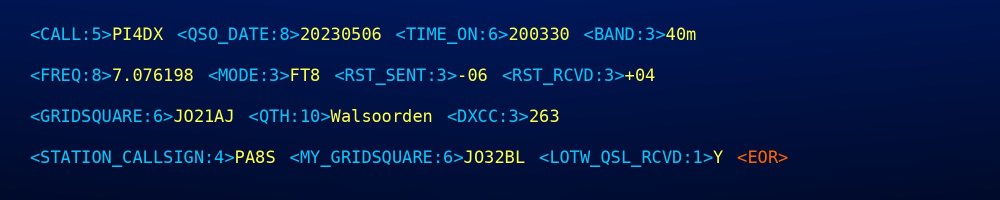
An ADIF file starts with an optional header, closed by <EOH>. After that come the QSO records, each closed by <EOR>. Every field is written as <NAME:length>value, where the length is the number of characters of the value.
Wavelog ADIF export
<ADIF_VER:5>3.1.8
<PROGRAMID:7>Wavelog
<EOH>

<CALL:5>PI4DX
<QSO_DATE:8>20230506
<TIME_ON:6>200330
<BAND:3>40m
<FREQ:8>7.076198
<MODE:3>FT8
<RST_SENT:3>-06
<RST_RCVD:3>+04
<GRIDSQUARE:6>JO21AJ
<QTH:10>Walsoorden
<DXCC:3>263
<STATION_CALLSIGN:4>PA8S
<MY_GRIDSQUARE:6>JO32BL
<LOTW_QSL_SENT:1>Y
<LOTW_QSL_RCVD:1>Y
<LOTW_QSLRDATE:8>20230724
<EOR>
This record, taken from my own Wavelog export and shortened a little, is a QSO with PI4DX in Walsoorden on 6 May 2023, at 20:03 UTC on 40m FT8. It was confirmed via LoTW on 24 July 2023. Wavelog writes one field per line, but any layout is fine: spaces and line breaks between fields are ignored.
The field names are not case‐sensitive and the order of the fields doesn’t matter. Besides this text format there is also ADX, an XML version, but you’ll rarely come across it.
The most important fields
| Field | Contents | Example |
|---|---|---|
| CALL | Call sign of the other station | PI4DX |
| QSO_DATE | Date in UTC, YYYYMMDD | 20230506 |
| TIME_ON | Start time in UTC, HHMM or HHMMSS | 200330 |
| BAND | Band | 40m |
| FREQ | Frequency in MHz | 7.076198 |
| MODE / SUBMODE | Mode and, if applicable, submode | FT8 (FT4 would be MFSK / FT4) |
| RST_SENT / RST_RCVD | Signal reports | −06 / +04 |
| GRIDSQUARE | Locator of the other station | JO21AJ |
| MY_GRIDSQUARE | Your own locator | JO32BL |
| STATION_CALLSIGN | The call sign you used | PA8S |
| TX_PWR | Transmit power in watts | 100 |
| DXCC | DXCC entity number of the other station | 263 (Netherlands) |
| QSL_SENT / QSL_RCVD | Paper QSL status (Y, N, R, Q, I) | N |
| LOTW_QSL_SENT / LOTW_QSL_RCVD | LoTW status | Y |
| SOTA_REF, POTA_REF, WWFF_REF | Reference for summits, parks or nature areas | |
Band values
The BAND field uses fixed names. These are the ones for the amateur bands most of us use, with their frequency range in MHz as defined by ADIF:
| BAND | Range (MHz) | BAND | Range (MHz) |
|---|---|---|---|
| 2190m | 0.1357–0.1378 | 15m | 21.000–21.450 |
| 630m | 0.472–0.479 | 12m | 24.890–24.990 |
| 160m | 1.800–2.000 | 10m | 28.000–29.700 |
| 80m | 3.500–4.000 | 6m | 50.000–54.000 |
| 60m | 5.060–5.450 | 4m | 70.000–71.000 |
| 40m | 7.000–7.300 | 2m | 144.000–148.000 |
| 30m | 10.100–10.150 | 70cm | 420.000–450.000 |
| 20m | 14.000–14.350 | 23cm | 1240.000‑1300.000 |
| 17m | 18.068–18.168 | 13cm | 2300.000‑2450.000 |
Modes and submodes
| Mode as you know it | MODE | SUBMODE |
|---|---|---|
| SSB | SSB | USB or LSB |
| CW | CW | |
| FM | FM | |
| FT8 | FT8 | |
| FT4 | MFSK | FT4 |
| JS8 | MFSK | JS8 |
| Q65 | MFSK | Q65 |
| FST4 | MFSK | FST4 |
| JT65 | JT65 | |
| PSK31 | PSK | PSK31 |
| RTTY | RTTY | |
| SSTV | SSTV | |
| D‑STAR | DIGITALVOICE | DSTAR |
| DMR | DIGITALVOICE | DMR |
| C4FM (System Fusion) | DIGITALVOICE | C4FM |
QSL status codes
The QSL_SENT, QSL_RCVD and their LoTW and eQSL counterparts use one‐letter codes:
| Code | QSL_SENT | QSL_RCVD |
|---|---|---|
| Y | Sent | Received |
| N | Not sent | Not received |
| R | Requested by the other station | Requested by me |
| Q | Queued to be sent | |
| I | Ignore or invalid | Ignore or invalid |
Things to watch out for
- Modes and submodes: many newer modes are a submode. FT4 for example is MODE MFSK with SUBMODE FT4. Some services group modes in their own way; LoTW for instance puts FT4 under MFSK and JS8 under DATA.
- Dates and times are always in UTC (see UTC and time in logging).
- Special characters: the length counts characters, so a name with accents can cause trouble in older software.
- Application fields start with
APP_, followed by the program name. Other programs simply ignore them.